VersAlta has partnered with Wizer to provide best-in-class cybersecurity training for Catholic entites as required by cyber insurance carriers. If you are interested in learning more, or signing up, email support@versalta.com.
For those Diocesan entities already signed up, please make sure that your IT administrators have “white-listed” the domain wizer-training.com as email invitations will come from no-reply@wizer-training.com (be sure to check your inbox and spam/junk folder just in case). This email will contain:
- A link to activate your account
- This link will be ONLY for you, but for security reasons, you will still need to enter your name and email.
- A direct link to begin your training (if already registered).
What You Need to Do:
- Open the Wizer invitation email.
- Click the activation link ("Go") and follow the instructions below to set up your account
- Complete the annual training modules within 30 days
- Stay current on watching the short monthly videos
- Additional phishing exercises may be assigned to help improve your phishing/smishing detection skills
If you have any questions or encounter any issues accessing the platform, please email support@versalta.com.
The welcome email will look something like the image shown below. The logo at the top should identify the organization providing the training, and the message may be tailored accordingly.
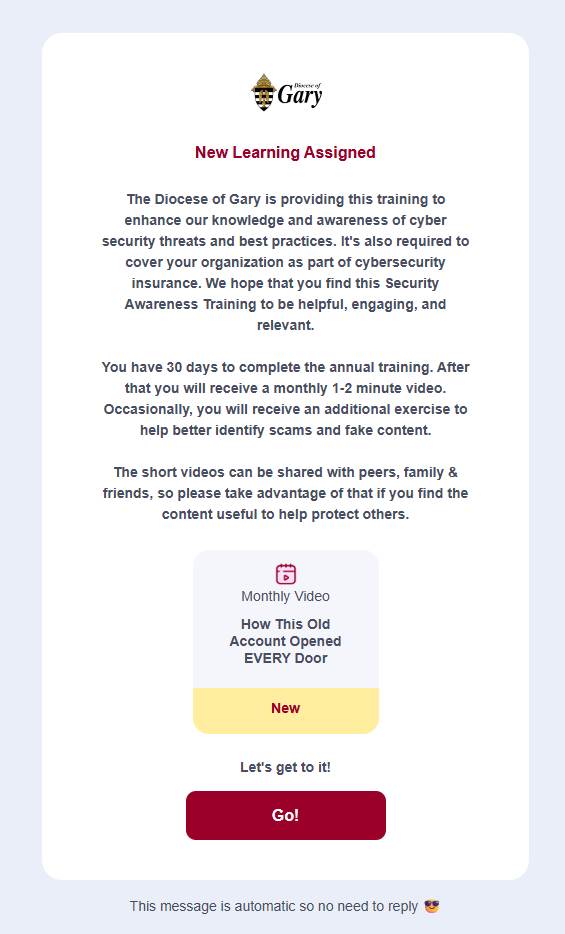
Reminders will be sent weekly on Wednesdays for incomplete tasks. If you have never registered, the links on those reminder emails will assist with registration. For users who have not yet registered, clicking on "Go" in either the welcome email or any of the reminder emails should see the following setup screen:
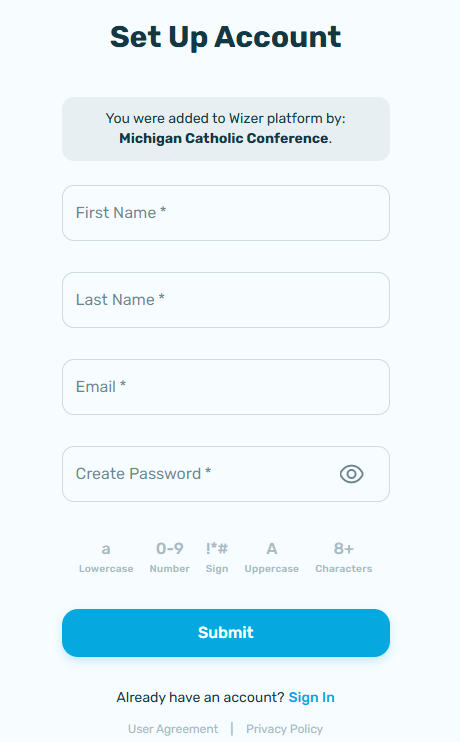
The email used must match the email where the welcome/reminder emails were received. Whatever the user enters below for First and Last Name will become the name used on the account (even if a different name was previously submitted).
Note: Specific videos on this platform can be shared with anyone, including friends and family members. We encourage doing so to help everyone protect themselves from scams. Thank you for your commitment to staying alert and keeping us secure.
You are the greatest defense against malicious attacks. Arm yourself with knowledge!
Was this article helpful?
That’s Great!
Thank you for your feedback
Sorry! We couldn't be helpful
Thank you for your feedback
Feedback sent
We appreciate your effort and will try to fix the article